


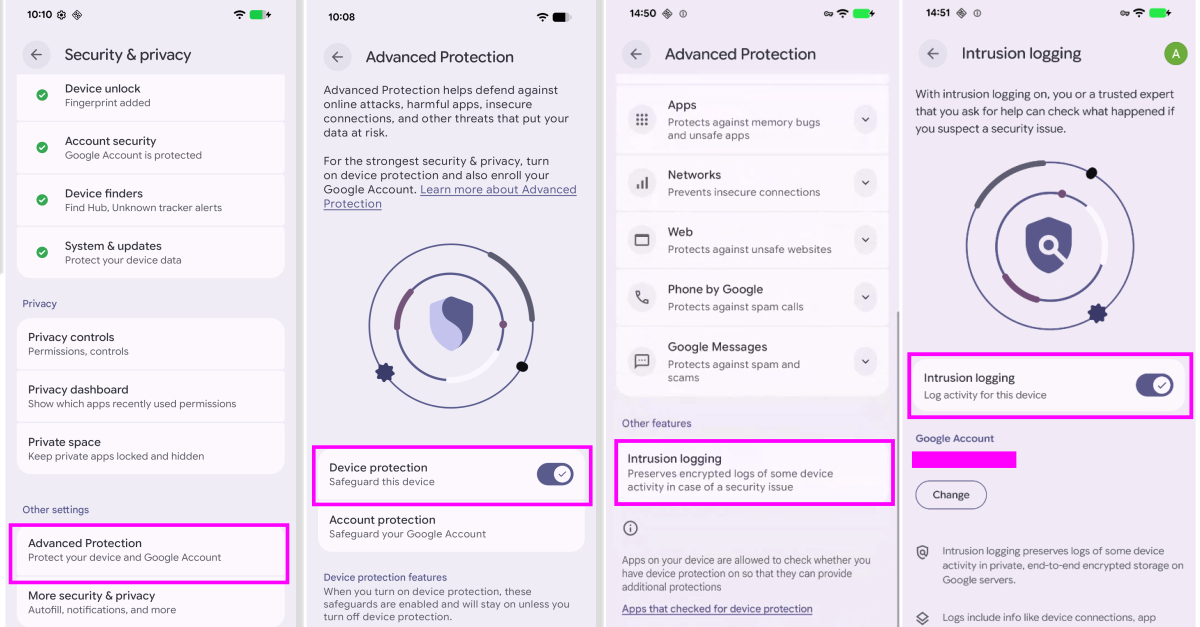

Google on Tuesday announced a new opt-in Android feature called Intrusion Logs to store forensic logs to better analyze advanced spyware attacks.
Intrusion logging, available as part of Advanced Protection Mode, “enables persistent privacy-preserving forensic logging and allows devices to be investigated in case of a suspected breach,” the company said.
It added that the feature was developed in partnership with Amnesty International and Reporters Without Borders. According to a help document shared by Google, Google logs device and network activity on a daily basis, including information about device behavior and various applications running on it.
The types of activities recorded are:
App activity (such as when an app process starts) Network connections such as installing, updating, and uninstalling apps Wi-Fi, Bluetooth, DNS lookups, and starting and stopping IP addresses File transfers to and from the device over USB System certificate changes When the device is locked or unlocked
Google also noted that log data is end-to-end encrypted by the device and stored on Google servers. Your encryption key is protected by your Google Account password and screen lock credentials. This means that no third party, including Google itself, can access the logs except for the device owner.
“By storing your data on secure servers, even malware installed on your smartphone cannot access, delete or manipulate your data,” Reporters Without Borders said. “End-to-end encryption ensures that neither Google nor nation-state agencies can access your data. Intrusion logging capabilities in particular enable the detection and forensic analysis of very sophisticated attacks that were previously difficult to detect.”
Encrypted logs are stored for 12 months, after which they are automatically deleted. Once intrusion logs are enabled, users cannot delete them before their 12-month expiration date, even if the account is closed or the feature is turned off. Users have the option to download logs offline if they wish to retain the logs for a long period of time.
That said, Google emphasized that users are responsible for their own security once the logs are downloaded and decrypted. “In certain legal or regulatory environments, providing access to decrypted data or security credentials may be required by law,” the report said.
Another thing to keep in mind when enabling this feature is that it also records network events generated during Chrome incognito browsing, such as DNS lookups and IP connections, because it operates at the system level and does not differentiate between browsing modes. In other words, anyone with access to the decrypted logs can collect which websites are visited, but cannot infer the specific pages of those sites.
The motivation behind intrusion logs is that high-risk individuals who suspect that they may be targeted by advanced surveillance tools due to their identity or behavior can share activity logs with trusted security experts for further investigation.
To download the logs, go to the Settings app,[セキュリティとプライバシー]->[高度な保護]->[侵入ログ]->[アクセス ログ]Tap. This feature is currently rolling out to all devices running Android 16 December update or later.
“With intrusion logging, Google becomes the first major vendor to proactively take on the challenge of detecting sophisticated attacks on devices,” Donncha Ó Cairbeil, director of Amnesty International’s Security Lab, said in a statement. “By making more consensual forensic data available to researchers, we can make life harder for attackers and help civil society hold people accountable when their devices are illegally targeted by spyware or mobile data extraction tools.”
More privacy and security features coming to Android
Besides intrusion logging, Google announced a number of privacy and security improvements. This includes new phone spoofing protection to combat verified financial calls and attacks where fraudsters impersonate banks to trick users into divulging sensitive data or transferring funds.
When a user receives a call that appears to be from a participating bank, Android asks the installed online banking app to confirm whether the user is actually trying to contact the customer. If the app determines that no such call is being made, the call will be automatically terminated by the system.
“Banks and financial institutions may also designate the number as inbound-only, meaning it is never used to call customers,” Google said. “Incoming calls from these numbers will be terminated directly.” The feature will be available on Android 11+ devices from Revolut, Itaú and Nubank in the coming weeks, and will then be expanded to more banks later this year.
Other notable changes include:
Extends Live Threat Detection to issue warnings about suspicious app behavior, such as SMS forwarding and accessibility overlays, which are commonly used by Android banking Trojans to steal credentials. If Safe Browsing is enabled before installation, it evaluates APK files downloaded through Chrome on Android for known malware. Remove access to the Accessibility Services API from all apps that aren’t labeled as accessibility tools. Disable cross-device unlocking and Chrome WebGPU support. Adds fraud detection to chat notifications. Enhance Find Hub’s Mark Lost feature to add the ability to biometrically lock your phone and prevent thieves from turning off device tracking when your device is marked lost. Triggering Mark as Lost also enables additional protections like hiding quick settings and disabling new Wi-Fi and Bluetooth connections. Reduces the number of times a PIN or password can be guessed by a third party with physical access to the device, and increases the wait time before a failed attempt. Improves device recovery by making the device’s IMEI number accessible from the lock screen on devices running Android 12 and later. Enhanced privacy controls allow you to temporarily share your precise location for certain tasks when a user has a specific app open, or give third-party apps access to specific contacts, rather than sharing your entire address book. Introducing AISeal and pKVM to provide hardware support and on-device isolation for artificial intelligence (AI)-related data processing. Extend binary transparency on Android and ensure integrity through official build and public ledger validation of genuine Google apps and underlying GMS APIs. Hides SMS one-time passwords (OTPs) from most apps for three hours to block OTP theft by malicious apps with SMS permissions. Provides carriers with the ability to disable 2G by default to protect customers from vulnerabilities in legacy technology. Introduce post-quantum encryption to enhance data protection and protect against future threats. Build in explicit user controls to opt in and out of features, security guardrails, and transparency when using Gemini on Android.
“By strengthening protection against bank fraud and extending powerful protections like Live Threat Detection and Android Advanced Protection, we are ensuring that Android remains the most secure platform,” said Eugene Liderman, Director of Android Security and Privacy.