

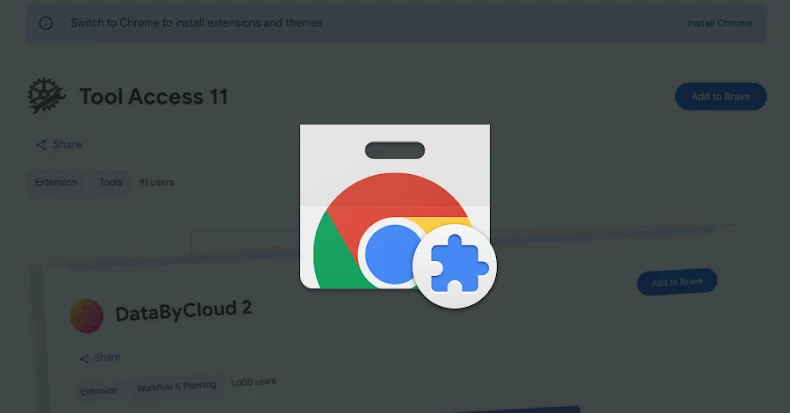

Cybersecurity researchers have discovered five new malicious Google Chrome web browser extensions that impersonate human resources (HR) and enterprise resource planning (ERP) platforms such as Workday, NetSuite, and SuccessFactors to take control of victims’ accounts.
“The extensions work together to steal authentication tokens, block incident response functionality, and enable complete account takeover through session hijacking,” socket security researcher Kush Pandya said in a report Thursday.
Extension names are listed below –
DataByCloud Access (ID: oldhjammhkghhahahadcifmmlefibciph, Publisher: databycloud1104) – 251 Tools Install Access 11 (ID: ijapakghdgckgblfgjobhcfglebbkebf, Publisher: databycloud1104) – 101 Install DataByCloud 1 (ID: mbjjeombjeklkbndcjgmfcdhfbjngcam, Publisher: databycloud1104) – 1,000 Installs DataByCloud 2 (ID: makdmacamkifdldldlelollkkjnoiedg, Publisher: databycloud1104) – 1,000 Installs Software Access (ID: bmodapcihjhklpogdpblefpepjolaoij, Publisher: Software Access) – 27 Installation

All services except Software Access have been removed from the Chrome Web Store at the time of writing. However, it is still available on third-party software download sites such as Softonic. The add-on is touted as a productivity tool that provides access to premium tools from a variety of platforms, including Workday, NetSuite, and other platforms. Two of the extensions, DataByCloud 1 and DataByCloud 2, were first published on August 18, 2021.
Despite using two different publishers, this campaign is described as a coordinated operation based on the same functionality and infrastructure pattern. These include exfiltrating cookies to a remote server under the attacker’s control, manipulating the Document Object Model (DOM) tree to block security management pages, and facilitating session hijacking through cookie injection.
Once installed, DataByCloud Access requests cookie, administrative, scripting, storage, and declarativeNetRequest permissions across Workday, NetSuite, and SuccessFactors domains. It also collects authentication cookies for the specified domain and sends them to ‘api.databycloud’.[.]com” domain every 60 seconds.
“Tool Access 11 (v1.4) prevents access to 44 admin pages within Workday by erasing page content and redirecting to malformed URLs,” Pandya explained. “This extension blocks authentication management, security proxy configuration, IP range management, and session control interfaces.”
This is achieved through DOM manipulation that maintains a list of page titles that the extension constantly monitors. Data By Cloud 2 expands blocking functionality to 56 pages and adds important features such as password change, account deactivation, 2FA device management, and security audit log access. It is designed to target both production environments and Workday’s sandbox test environment (“workdaysuv”).[.]Com. ”
In contrast, Data By Cloud 1 replicates the cookie stealing functionality of DataByCloud Access while also incorporating functionality that prevents code inspection using web browser developer tools using the open source DisableDevtool library. Both extensions encrypt command and control (C2) traffic.
The most sophisticated extension is Software Access. This is a combination of cookie theft and the ability to receive stolen cookies from ‘api.software-access’.[.]com” and injects it into the browser to facilitate direct session hijacking. Additionally, it is equipped with password input field protection to prevent users from inspecting the input of credentials.
“This function parses the cookies from the server payload and removes existing cookies for the target domain. It then iterates through the provided cookie array and inserts each cookie using chrome.cookies.set(),” Socket said. “This installs the victim’s authentication state directly into the threat actor’s browser session.”

The notable thing that ties all five extensions together is that they feature an identical list of 23 security-related Chrome extensions designed to monitor and notify threat actors of their presence, including EditThisCookie, Cookie-Editor, ModHeader, Redux DevTools, and SessionBox.
This is likely an attempt to assess whether web browsers have tools that could thwart the purpose of cookie collection or reveal extension behavior, Socket said. Additionally, all five extensions have a similar list of extension IDs, giving rise to two possibilities: either they are the work of the same attacker published under different publishers, or they are the work of a common toolkit.
Chrome users who have installed any of the aforementioned add-ons are encouraged to remove them from their browsers, reset their passwords, and check for signs of unauthorized access from unfamiliar IP addresses or devices.
“The combination of persistent credential theft, administrative interface blocking, and session hijacking creates a scenario where security teams can detect unauthorized access but cannot remediate it through normal channels,” Socket said.
Source link
