



Security teams have spent years building identity and access controls for human users and service accounts. However, a new category of actors has quietly infiltrated most enterprise environments and operates completely outside of their control.
Anthropic’s AI coding agent, Claude Code, is now running at scale across engineering organizations. It reads files, executes shell commands, calls external APIs, and connects to third-party integrations called MCP servers. All of this runs autonomously on the developer’s local machine, with the full privileges of the developer who launched it, before any network-layer security tools are aware of it. It leaves behind no audit trail that your existing security infrastructure was built to capture.
This tutorial introduces Ceros, an AI trust layer built by Beyond Identity. Ceros resides directly on developers’ machines with Claude Code, providing real-time visibility, runtime policy enforcement, and an encrypted audit trail of every action an agent performs.
Problem: Claude code operates outside of existing security controls
Before we discuss the product, it will help you understand why existing tools cannot address this problem.
Most enterprise security tools are located at the network edge or API gateway. These tools look at your traffic after it leaves your machine. By the time the SIEM ingests an event or the network monitor flags anomalous traffic, the Claude code is already working. That is, the file has already been read, the shell command has already been executed, and the data has already been moved.
Claude Code’s behavioral profile greatly exacerbates this problem. It lives off the land, using tools and permissions that already exist on the developer’s machine, rather than bringing in anything of its own. Communicate through external model calls that look like normal traffic. It performs a complex series of actions that are not explicitly programmed by humans. It also runs with fully inherited privileges from the invoker, including access to credentials, operational systems, and any sensitive data that the developer happens to have on his or her machine.
The result is a gap that network layer tools cannot structurally fill. This means that all the processing that the Claude code does on your local machine happens before the request leaves the device. That is where Ceros operates.
Introduction: 2 commands, 30 seconds
Ceros is designed so that installation does not interrupt a developer’s workflow. Setup requires two commands.
curl -fsSL https://agent.beyondidentity.com/install.sh | bash selos claude

The first command installs the CLI. The second launches Claude Code through Ceros. A browser window will open, ask you to enter your email address, and send you a six-digit verification code. Once you enter the code, Claude Code will launch and work exactly as before. From a developer’s perspective, nothing has changed.
When rolling out across an organization, administrators can configure Ceros to automatically prompt developers to register when they launch Claude Code. Security becomes invisible to developers. This is the only way to really implement security at scale.
Once registered, Ceros captures the complete device context including OS, kernel version, disk encryption status, secure boot state, and endpoint protection status, all within 250 milliseconds, before Claude Code generates a single token. It uses binary hashes of all executables in the chain to capture the complete process ancestry of how Claude code was called. It then connects the session to a verified human identity through Beyond Identity’s platform, signed with a hardware-bound cryptographic key.
Console: See what the Claude code is actually doing
After registering a device and running Claude Code normally for a few days, you go to the Ceros management console and see something most security teams have never seen before. This is a complete record of what Claude Code was actually doing across the environment.

When a developer asks Claude Code a simple question like “What files are in my directory?” LLM simply doesn’t know the answer. This tells the agent to run a tool (in this case bash ls -la) on your local machine. That shell command runs on the developer’s device using the developer’s permissions. One casual question triggers a real run on a real machine.
[会話]The view shows all calls to these tools per session. For most security teams, this is the first time they’ve seen this data.
The MCP server view is where many security teams have their most important moments of discovery. The MCP server is how Claude Code connects to external tools and services such as databases, Slack, email, internal APIs, and operational infrastructure. Developers add these casually, thinking more about productivity than security. Each is a data access path that no one considers.
The Ceros dashboard shows all MCP servers connected to Claude Code across all registered devices, when they first appear, on which devices they appear, and whether they are authorized. In most organizations, there is a wide gap between what security teams assume is connected and what is actually connected.
Policies: Apply controls to your code at runtime
Visibility without governance exposes risks, but does not prevent them. The policy section is where Ceros moves from monitoring to enforcement and where the compliance story takes shape.
Policies in Ceros are evaluated at runtime before any actions are taken. This distinction is important for compliance. Controls operate at the moment of action and are not reconstructed after the fact.

The MCP server allow list is the first and most impactful policy that most organizations create. Administrators define a list of approved MCP servers and set defaults to block all others. From then on, any instances of Claude code that attempt to connect to an unauthorized MCP server will be blocked before the connection is established, and the attempt will be logged.
Tool-level policies allow administrators to control which tools Claude Code can call and under what conditions. Policies can completely block Bash tools for teams that do not require shell access from agents. You can allow files in your project directory to be read while blocking reads in sensitive paths such as ~/.ssh/ and /etc/. The policy engine evaluates not only which tool is being called, but also what arguments are being passed. This is the difference between useful policy and policy theater.
Device posture requirements gate Claude code sessions based on the security state of the machine. Policies can require disk encryption to be enabled and endpoint protection to be in place before a session is allowed to start. Ceros continually re-evaluates the state of your device throughout the session, not just at login. If endpoint protection is disabled while the Claude code is active, Ceros will recognize this and act on policy.
Activity log: auditable evidence
The activity log is where Cero relates directly to compliance teams. Every entry is more than just a record. This is a forensic snapshot of the environment at the exact moment Claude Code was called.
A single log entry includes the complete security posture of the device at that point in time, the complete process ancestor of all processes in the chain that called the Claude code, the binary signatures of all executables within that ancestor, the OS-level user ID associated with the verified human, and all actions the Claude code took during the session.

This is important for compliance, as auditors increasingly demand proof that logs are immutable. Standard log files that can be edited by administrators do not meet this requirement. Ceros signs every entry using a hardware-bound encryption key before it leaves the machine. Logs cannot be modified after the fact.
For frameworks that require tamper-proof audit records, such as SOC 2’s CC8.1, FedRAMP’s AU-9, HIPAA’s audit control requirements, and PCI-DSS v4.0’s Requirement 10, this is a specific evidence artifact that satisfies the controls. When auditors ask for evidence of AI agent monitoring and access control, the answer is an export from the Ceros dashboard that covers the entire audit period, is cryptographically signed, and includes user attributes and device context for each entry.
Managed MCP Deployment: Standardize Claude Code’s Tools Across Your Organization
For organizations that want to standardize the tools available in Claude Code in addition to blocking unauthorized tools, Ceros offers managed MCP deployment from the admin console.
Administrators can push authorized MCP servers to all developer code instances from a single interface without requiring any developer configuration. The MCP server will automatically appear in the developer’s agent the next time it starts.
Combined with the MCP server allow list, it creates a complete governance model. Administrators define what is required, what is allowed, and what is blocked. Developers work frictionlessly within that confines.
Dashboard: Agentic AI risk posture across your organization

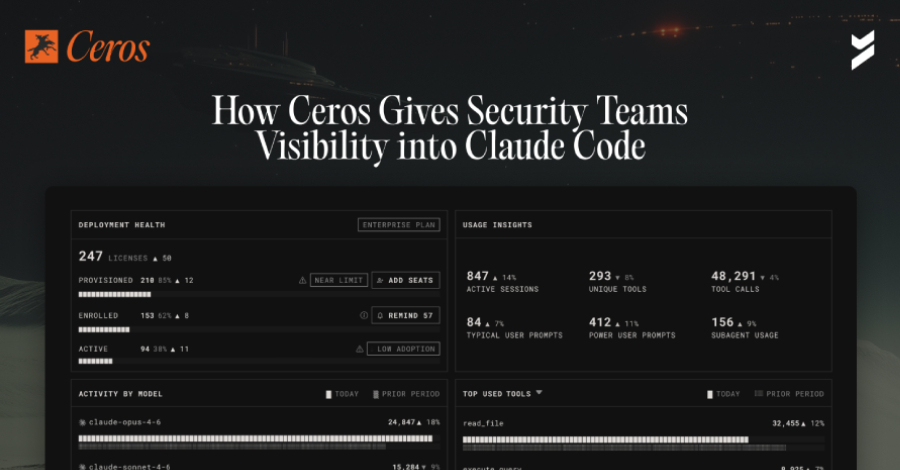
What’s coming is a dashboard that provides a single view of the AI risk landscape across registered organizations. While the session-level view shows what a single developer’s agents have done, the dashboard shows what’s happening across the fleet: how many devices are provisioned, registered, and actively running Claude Code. Adoption gaps also automatically flag when agents are shown to be running outside of the Ceros registration path and control. Sign up to receive a notification when your dashboard ships.
conclusion
Claude code creates security gaps not at the network edge. It resides on the developer’s machine and the agent runs before existing security tools know about it. Ceros bridges that gap by staying where agents are, capturing everything before they run, and producing cryptographically signed evidence that security and compliance teams can act on.
For security teams whose organizations are introducing cloud code and starting to consider what it means for their audit posture and controls, the starting point is visibility. You can’t manage what you can’t see. Until now, there was no tool that could show you what Claude Code was actually doing.
Ceros is available now and free to get started. Security teams can register a device and see its crawl code activity for the first time on beyondidentity.ai.
Built by Beyond Identity, Ceros is SOC 2 / FedRAMP compliant and can be deployed as cloud SaaS, self-hosted, or fully air-gapped on-premises.